EdTech Kickoff Series AY2026/2027 Semester 1
AY2026/27 Semester 1
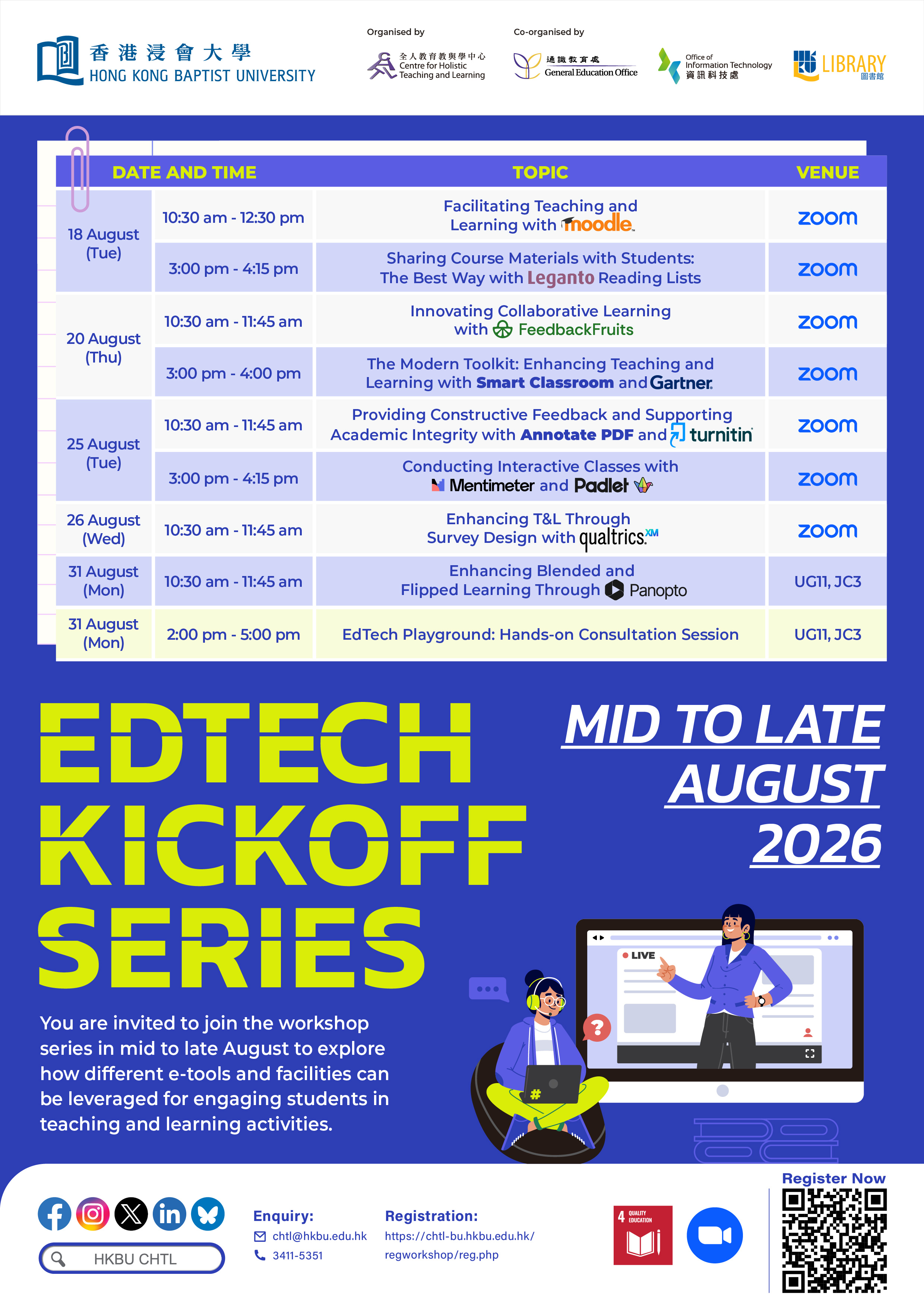
You are invited to join this workshop series in mid to late August to explore how different e-tools and facilities can be leveraged for engaging students in teaching and learning activities.
Outline
Sustainable Development Goals (SDG) Mapping

Workshop Details
Facilitator(s):
Mr Paul YUM (CHTL) and ITO colleague
Abstract:
To facilitate your teaching and enhance student learning, it is useful to get familiar with the Learning Management System (LMS) adopted at HKBU, Moodle, for high-quality teaching and learning. This workshop will provide you with an overview of Moodle’s basic functions essential for you to kick off a course, from setting up a courseroom and Moodle SharePoint to customising various learning activities.
By the end of this workshop, you should be able to:
Identify basic functions available in Moodle;
Use the features of Moodle to enhance teacher teaching and student learning
Facilitator(s):
Ms May WONG (LIB)
Abstract:
Save your time and say goodbye to scattered materials. Leganto Reading Lists give students easy, centralised access to all course materials directly within Moodle. This best way enhances learning with a mix of library and external resources.
In this workshop, you will learn how to
Collaborate with the Library to build Leganto Reading Lists;
Add library and external resources to your own list;
Monitor student engagement through analytics
By the end of this workshop, you should be able to:
Identify key features of Leganto Reading Lists;
Create and manage course readings effectively;
Apply Leganto to support teaching and enhance student engagement
Facilitator(s):
Mr Kendall YAN (CHTL) and Mr Sebastian PAHS (GSIS)
Abstract:
Opportunities for collaborative learning lie in reading activities, which students tend to complete in silo, and peer evaluations, where peer feedback promotes reflection on one’s work or contribution to a group project. Two tools from the Moodle-embedded FeedbackFruits will be introduced in this session to help you create collaborative reading opportunities (Interactive Document) and streamline peer-review workflows (Peer Review), fostering meaningful dialogue and strengthening learning outcomes. An award-winning use case of FeedbackFruits for supporting team-based learning will also be shared.
By the end of this workshop, you should be able to:
Identify the key features and functionalities of FeedbackFruits;
Create interactive reading activities with FeedbackFruits;
Apply FeedbackFruits to design effective peer-assessment activities that align with intended learning objectives.
Facilitator(s):
Mr Edwin WONG (ITO) and Ms Cindy KWONG (ITO)
Abstract:
This workshop is designed to provide academic staff with the knowledge they need to confidently use university technology in real teaching scenarios. We will explore how digital tools can make your classrooms more engaging and student focused. You will also learn how to apply insights from Gartner to keep your courses both industry-relevant and up to date.
The workshop focuses on two key areas:
The Smart Classroom: to facilitate active learning
Gartner Insights: to enrich your curriculum with up-to-date industry insights
Learning Outcomes:
By the end of this comprehensive workshop, you will be able to:
Part 1: Facilitate Active Learning in the Smart Classroom
Design interactive lessons using the AV system’s one-touch start-up and multiple content sources.
Enhance hybrid teaching with ceiling microphones and student cameras for seamless engagement.
Enable student-led collaboration through wireless screen sharing via eShare.
Use the visualizer as a digital whiteboard for live demonstrations.
Part 2: Enrich Curriculum with Gartner Insights
Incorporate relevant Gartner research to keep your curriculum aligned with industry trends.
Develop teaching activities using Gartner reports as real-world case studies.
Facilitator(s):
Dr Louis CAI (CHTL)
Abstract:
Assignments evaluate students’ attainment of the intended learning outcomes and can help identify directions for further development. This workshop will introduce using Turnitin to promote academic honesty by identifying potential plagiarism and guiding students on proper citation practices. It will also demonstrate Turnitin-embedded feedback tools and Annotate PDF, a tool separate from Turnitin, which can be used to provide more specific feedback for student development, in addition to an overall grade.
By the end of this workshop, you should be able to:
Apply Turnitin to support academic integrity;
Use Turnitin-embedded feedback tools and Annotate PDF to provide constructive feedback on student work.
Facilitator(s):
Mr Pakho HUANG (CHTL)
Abstract:
Mentimeter and Padlet are powerful digital tools designed to transform traditional lessons into dynamic, collaborative experiences. Mentimeter enables engaging, real-time polls and interactive presentations, while Padlet provides a digital canvas for brainstorming, discussion, and content sharing.
This session will provide a step-by-step guide on setting up both platforms. It will demonstrate how to create dynamic slides in Mentimeter, utilising features like live word clouds and Q&A sessions, and collaborative boards in Padlet for group activities and resource collection. We will explore how these functions can be used to enhance engagement and learning outcomes.
By the end of this workshop, you should be able to:
Identify the pedagogical functions of Mentimeter and Padlet for conducting interactive classes;
Apply features from Mentimeter to create engaging presentations;
Create Padlet boards for collaboration, resource sharing, and peer feedback.
Facilitator(s):
Mr Kendall YAN (CHTL)
Abstract:
Planning to conduct survey-based data collection for T&L and research? It is useful to get familiar with Qualtrics, an online survey tool available at HKBU. In this workshop, you will learn how to create and administer surveys using various question types. Specifically, this session will cover:
Survey design and creation from Standard to Advanced Question Types;
Survey Sharing and Collaboration;
Logic and Survey Flows;
Dashboard Reports;
Survey Distribution Options;
Experience sharing on using Qualtrics for facilitating teaching and learning (Kendall confirmed)
By the end of this workshop, you should be able to:
Identify basic functions available in Qualtrics for creating surveys;
Distribute surveys to students and/or colleagues;
Collaborate on surveys with colleagues.
Facilitator(s):
Mr Kendall YAN and Dr Louis CAI (CHTL)
Abstract:
Videos play diverse roles in blended and flipped learning, from providing pre-class input to allowing students to revisit in-class learning. Video-based assignments also offer chances for students to share authentic voices and practice communication. Panopto is an online video platform designed for video capture, production, and management, as well as interactive video-based learning. This session will guide you through Panopto’s key features, including recording, editing videos, embedding quizzes, and analysing viewer engagement, to enhance teaching and learning experiences.
Whether you are new to Panopto or looking to maximise its potential, this workshop will equip you with the skills to produce, manage, and share video content effectively.
By the end of this workshop, you should be able to:
Create video content in Panopto’s platform;
Utilise advanced features like smart search, in-video quizzes, and discussion tools;
Apply Panopto for flipped classrooms, blended learning, and enhancing student engagement;
Facilitate students in producing video-based assignments using Panopto’s submission features.
Facilitator(s):
CHTL, ITO, and LIB colleagues
Abstract:
Complementary to the workshops, the consultation provides a hands-on opportunity to explore the facilities and EdTech tools covered in the workshops. Come and join the consultation with colleagues from the eLearning support team to discuss your specific use cases and transform ideas into resources directly applicable in your classes.
By the end of the session, you will be able to:
- Select educational technology that serves your pedagogical needs;
- Set up the selected educational technology for teaching, learning, and/or assessment.